The One-Line Maze Program in MATLAB

A classic one-line program for the Commodore 64 microcomputer is

10 PRINT CHR$(205.5+RND(1)); GOTO 10

This is essentially what was printed in the section “Random Graphics” of the Commodore 64 User’s Guide (1982). The program prints a random maze that gradually builds up on-screen. The following video demonstrates it

I recently came across a 309-page book by Montfort et al. (MIT Press, 2013) dedicated to discussing this program from every conceivable angle. The book, which can be freely downloaded in PDF form, has as its title the program itself and was written by a team of ten authors with backgrounds in digital media, art, literature, and computer science. I found the book an interesting read, not least for the memories it brought back of my days programming the Commodore PET and Commodore 64 machines in the early 1980s (discussed in this post about the Commodore PET and this post about the Commodore 64). I suspect that never has so much been written about a single line of code!

Various translations of the program into other languages have been done, but I could not find a MATLAB version. Here, then, is my MATLAB offering, which takes advantage of the MATLAB char function’s ability to produce Unicode characters:

while 1, fprintf('%s\n',char(rand(1,80)+9585.5)); pause(.2), end

The pause command is not necessary but helps to slow the printing down, and the argument of pause may need adjusting for your computer.

Are there other interesting MATLAB one-liners? This one is from Mike Croucher:

x=[-2:.001:2]; plot(x,(sqrt(cos(x)).*cos(200*x)+sqrt(abs(x))-0.7).*(4-x.*x).^0.01)

And here is one to compute the Mandelbrot set, condensed from the code mandel in MATLAB Guide:

[x,y]=ndgrid(-1.5:5e-3:1.5); c=x+1i*y; z=c; for k=1:50, z=z.^2+c; end, contourf(x,y,abs(z)<1e6)

If you know any other good one-liners please put them in the comment box below.

Iterating MATLAB Commands

Some MATLAB commands can be “applied to themselves”. A good example is help help, which provides help on the help function. For what other functions fun is fun fun a legal statement that produces something interesting? Here are some examples (by no means an exhaustive list).

char char
demo demo
diary diary
doc doc
diff diff
double double
edit edit
error error
iskeyword iskeyword
length length
magic magic
max max
size size
sort sort
spy spy
unique unique
upper upper
warning warning
which which

Can you see why these are legal and guess what the effect of these calls will be? Search for “command-function duality” in the MATLAB help for some clues.

Are there any legal triple invocations? Yes, for example

and and and
char char char
isa isa isa
max max max

Indeed char can be iterated as many times as you like, but and and isa can be iterated three times but not twice.

If you think of additional interesting examples, please add them to the comments below.

Programming the Commodore PET

My first programming languages were Fortran, learned in my mathematics degree, and Basic, which was the language built into the ROM (read only memory) of the Commodore PET. The PET—one of the early microcomputers, first produced in 1977—stored programs on cassette tapes, using its integral cassette deck. In those days you could buy programs on tape, at what today would seem very high prices, but people mostly wrote their own programs or typed them in from a magazine.

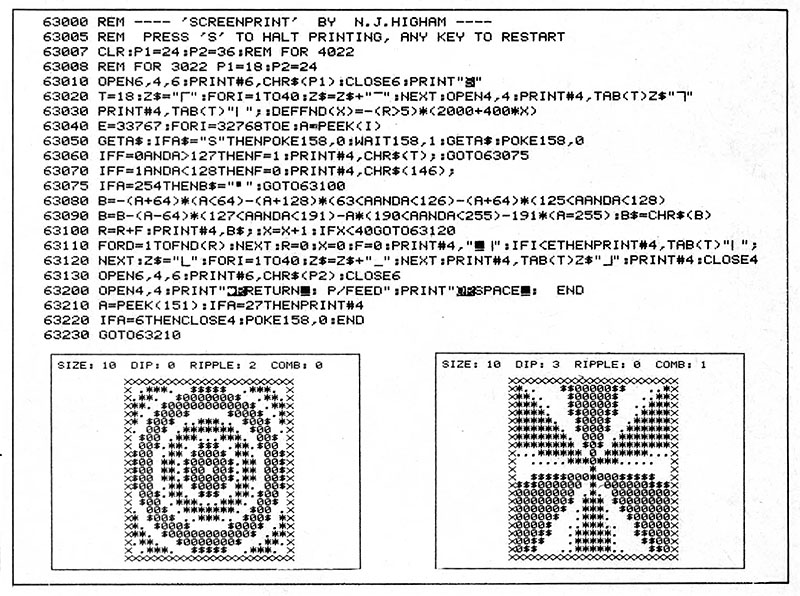
Many computer magazines existed that published (and paid for) programs written by hobbyists. Readers would happily type in a page or two of code in order to try the programs out. The two most popular categories of programs were games and utilities. I recently came across a file in which I’d kept a page from the January 1982 issue of Your Computer magazine containing one of my first published programs. The whole page is here in PDF form.

screenprint82.jpg

The purpose of the Screenprint program is to print the contents of the PET’s screen to an attached Commodore printer—something there was no built-in way to do. The pictures underneath the listing are screen dumps of the output from another program I wrote called Whirly Art.

Some explanation of the code is needed.

  • In Commodore Basic (a variant of Microsoft Basic) , line numbers are essential and are the target for a goto statement, which jumps to the specified line. Notice that the line numbers here are spaced about 10 apart: this is to allow for insertion of intermediate lines as the code is developed. There was no standard way to renumber the lines of a program, but I think I later acquired an add-on ROM that could do this.
  • There are no spaces within any non-comment line of code. Today this would be terrible coding practice, but each space took one byte of storage and in those days storage was at a premium. This bit of code was intended to be appended to another program, so it was important that it occupy as little memory as possible. The Basic interpreter was able to recognize keywords IF, THEN, FOR, etc., even when they were not surrounded by spaces.
  • The PEEK command reads a byte from RAM (random access memory) and the POKE commands writes a byte to RAM. CHR$(A) is a string character with ASCII value A.

I was surprised to find that scans of many issues of Your Computer are available on the Internet Archive. Indeed that archive contains a huge range of material on all topics, including a selection of books about the Commodore PET, some of which are in my loft but which I have not looked at for years.

Updated Catalogue of Software for Matrix Functions

help-matfun.jpg
From “help matfun” in MATLAB.

Edvin Deadman and I have updated the catalogue of software for matrix functions that we produced in 2014 (and which was discussed in this post). The new version, which has undergone some minor reorganization, is available here. It covers what is available in languages (C++, Fortran, Java, Julia, Python), problem solving environments (GNU Octave, Maple, Mathematica, MATLAB, R, Scilab), and libraries (GNU Scientific Library, NAG Library, SLICOT).

nag-mark25.jpg
From NAG LIbrary Mark 25 News.

Here are some highlights of changes in the last two years that are reflected in the new version.

Other changes to the catalogue include these.

  • SLICOT has been added.
  • Two more R packages are included.

Suggestions for inclusion in a future revision are welcome.

Manchester 1970s Video Computer Science Lectures

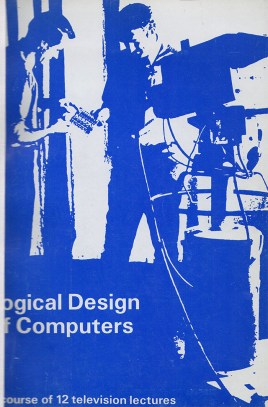
lavi72-cover.jpg
Left side of cover is obscured by library binding.

At The University of Manchester nowadays, every lecturer is a podcaster. Sound from microphones and projected material is automatically recorded in lecture rooms, enabling registered students to revisit a lecture at any time after it has been given. These recording are not used for subsequent lecture delivery, as far as I know, though the recording quality is good. See here for details of the Manchester system.

More than forty years ago the Department of Computer Science in Manchester was pioneering something that is still not widespread here today: videoed lectures that are used to deliver a course. The motivation was the need to teach efficiently the 500 or more students a year from across the university who needed to take computer science as a subsidiary course.

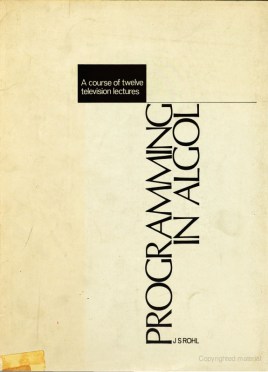
rohl70.jpg

Simon Lavington and Jeff Rohl developed three video courses, in this order:

  • “Logical Design of Computers” (12 lectures, Simon Lavington),
  • “Programming in Algol” (12 lectures, Jeff Rohl), and
  • “Programming in Fortran” (10 lectures, Jeff Rohl).

I wrote about the latter course in an earlier blog post. All three courses had an accompanying book (Logical Design of Computers, 1969, second edition 1972; Programming in Algol, 1970; Programming in Fortran, 1973).

Each lecture was 20 to 30 minutes long and recorded in a TV studio in one continuous take, with no autocue and no possibility of editing the recording. Information was displayed interactively by the lecturer on a magnet board, using magnetic symbols. For each lecture, the lecturer spent around 20 hours in script preparation and production meetings, and a full day in rehearsal and recording.

The cost of making a 12-lecture course at 1968 prices was estimated at £4,000, excluding the lecturer’s time, which today equates to about £65,000! All three course were sold to other institutions (12 universities and one company in the case of “Logical Design of Computers”).

Television-studio-Manchester-1968.jpg
Simon Lavington in action in the University’s TV studio in 1968.

Much of the information in the previous two paragraphs comes from a 1971 paper Experience with Television Courses for Computer Science Teaching by Simon Lavington and Jeff Rohl. That paper also describes the mode of delivery of the course (a course tutor provided a tutorial following each lecture) and assesses its success. The authors conclude that “under satisfactory playback conditions and with an understanding course-tutor, the students are enthusiastic about television lectures and respond to the intellectual challenge they offer.”

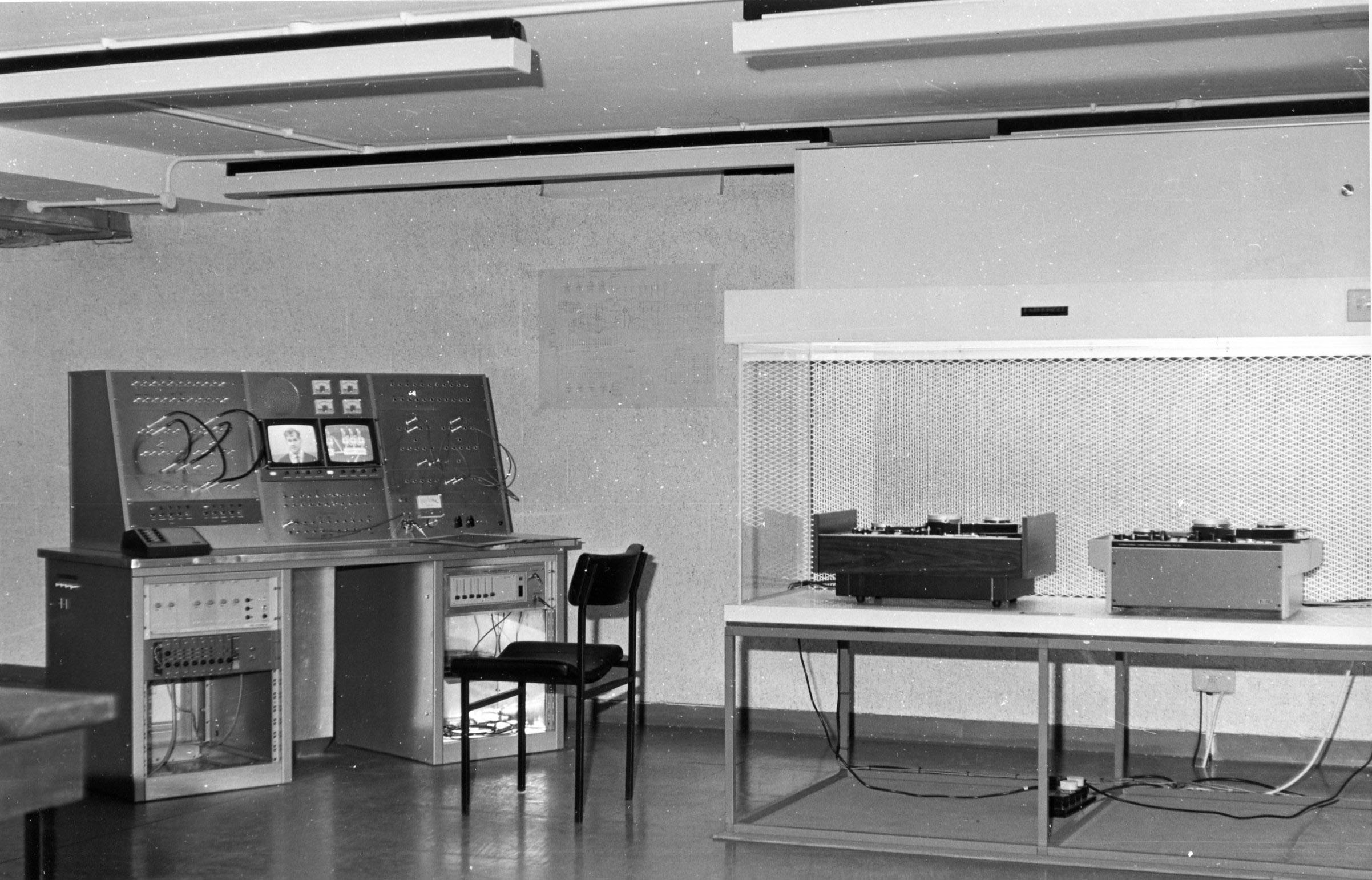
The following photo shows the replay equipment designed and installed in the Kilburn Building when it first opened in 1972. Jeff Rohl can be seen on the left monitor at the control desk and a diagram for a parallel adder is displayed on the right-hand monitor.

TV-replay-equip-Kilburn-Bldg-Spring-1973.jpg

I can’t help thinking that Simon and Jeff were well ahead of their time in developing these courses. If the University’s Teaching Excellence Awards had been around at the time they would have been worthy winners.

I am grateful to Simon for providing me with information about these courses, along with the paper and the two photos.

Typewriter Art

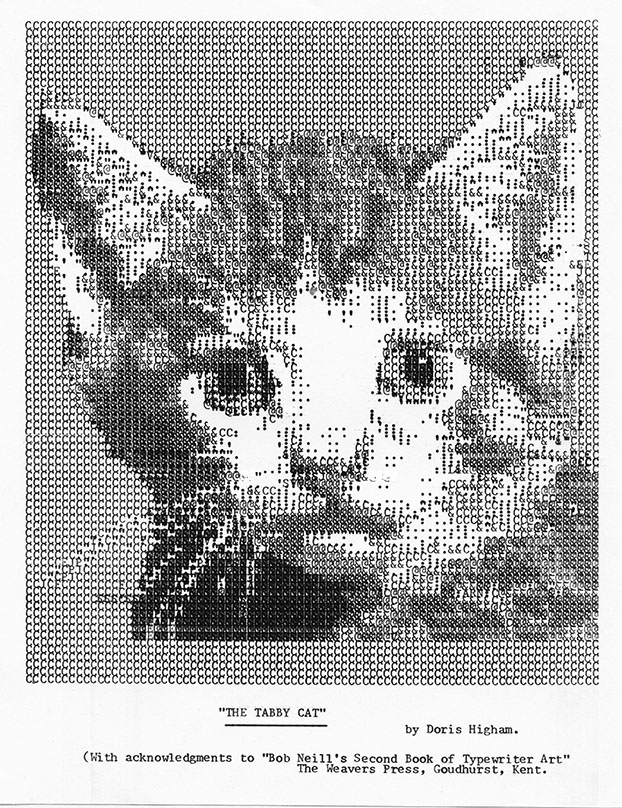
In 1981 my mother showed me a magazine (Woman’s Realm) that had instructions for producing on a typewriter a portrait of Prince Charles. The instructions had been designed by Bob Neill, who had worked out how represent a photograph of Prince Charles as a 100-by-79 grid of characters, choosing the density of each character appropriately and exploiting the facility of a typewriter to issue a carriage return without line feed and thereby overwrite one character with another. The instructions looked like

(6) 26G 16@ 1& 36G
(6a) 22sp 2. 1: 95 1& 15 1& 3S 2& 3: 1.

which say that on the 6th line you should type the letter G 26 times followed by 16 @ symbols, etc., then overwrite the line with 22 spaces, 2 full stops, etc.

prince-charles-portrait.jpg

This is an example of ASCII art, though ASCII art does not usually involve overwriting characters.

At the time I had a Commodore Pet microcomputer and it struck me that the painstaking process of typing the image would be better turned into a computer program. Once written and debugged the program could be used to print multiple copies of the image. By switching the data set the program could be used to print other photos. So I wrote a program in Commodore Basic that printed the image to a Commodore 4022 dot matrix printer.

I sent the program to Bob. He liked it and printed the program in an appendix to his 1982 book Bob Neill’s Book of Typewriter Art (With Special Computer Programme). That book contains instructions for typing 20 different images, including other members of the royal family, Elvis Presley and Telly Savalas (the actor who played Kojak in the TV series of the same name, which was popular at the time), and various animals,. Bob Neill’s Second Book of Typewriter Art was published in 1984, which reprinted my original program. It included further celebrities such as Adam Ant, Benny from Crossroads, “J.R.” from Dallas and Barry Manilow

I recently came across some articles describing Bob’s work, including one by his daughter, Barbara, one by Lori Emerson that includes a PDF scan of the first book, and an article The Lost Ancestors of ASCII Art. The latter pointed me to a recently published book Typewriter Art: A Modern Anthology. This resurgence of interest in typewriter art prompted me to look again at my code.

I had revisited my original 1982 Basic code later in the 1980s, converting it to GW-Basic so it would run on IBM PCs with Epson printers. I had also added the data for The Tabby Cat from Bob’s second book. Here is an extract from the code, complete with GOTOs and GOSUBs (GW-Basic had few structured programming features).

10 REM TYPEART.BAS
20 REM Program by Nick Higham 1982 (Commodore Basic),
30 REM and 1988 (GW-Basic/Turbo Basic).  (c) N.J. Higham 1982, 1988.
40 REM Designs by Bob Neill.  (c) A.R. Neill 1982, 1984.
...
530 REM -----------------------------
540 REM ROUTINE TO PRINT OUT DATABASE
550 REM -----------------------------
560 DEV$ = "LPT"+PP$+":"
570 OPEN DEV$ FOR  OUTPUT AS #1
580 PRINT #1, RESET.CODE$
590 WIDTH #1,255 ' this stops basic inserting unwanted carriage returns
600 GOSUB  800
610 L$=""
620 GOSUB 700:IF A$="/" THEN PRINT#1, NORMAL.LFEED$+L$: GOTO 610
630 IF A$="-" THEN PRINT#1, ZERO.LFEED$;L$: GOTO 610
640 A=ASC(A$):IF A>47 AND A<58 THEN A=A-48: GOTO 660
650 L$=L$+A$: GOTO 620
660 GOSUB 700:B=ASC(A$):IF B>47 AND B<58 THEN A=10*A+B-48: GOSUB 700
670 FOR I=1 TO A:L$=L$+A$:NEXT: GOTO 620
680 '
690 REM -- SUBROUTINE TO TAKE NEXT CHARACTER FROM Z$
700 A$=MID$(Z$,P,1):P=P+1: IF A$<>" "  AND A$<>"" THEN 730
710 IF P>Z THEN GOSUB 800
720 GOTO 700
730 IF A$="]" THEN A$=" "
740 IF A$="#" THEN A$=CHR$(34)
750 IF A$="^" THEN A$=":"
760 IF P>Z THEN GOSUB 800
770 RETURN
780 '
790 REM -- SUBROUTINE TO READ NEXT LUMP OF DATA
800 READ Z$:Z=LEN(Z$):P=1
810 IF Z$="PAUSE" THEN  FOR D=1 TO 20000:NEXT: GOTO 800
820 IF Z$="FINISH" THEN PRINT #1, CHR$(12)+RESET.CODE$: CLOSE #1:END
830 RETURN
840 '
850 REM -------------------------------------
860 REM * DATABASE1 - H.R.H. PRINCE CHARLES *
870 REM -------------------------------------
880 '
890 DATA "H.R.H. Prince Charles"
900 DATA  79G/79G/79G/79G
910 DATA  /79G-25]2.2^2&^L2^2&3^2.
920 DATA /26G16@&36G-22]2.^9]&S&3S2&3^.
930 DATA /22G23@34G-20].^10&]3&^6Y2C&^.
...
4710 '
4720 REM -- EXPLANATION OF DATA --
4730 REM / MEANS NEWLINE
4740 REM - MEANS CONTINUATION LINE
4750 REM 29G MEANS PRINT 29 LETTER G'S.
4760 REM @ MEANS PRINT ONE @ CHARACTER.
4770 REM CHARACTERS : " AND 'SPACE'
4780 REM ARE REPRESENTED BY ^ # AND ]
4790 REM IN THE DATA STATEMENTS.
4800 REM ALL OTHER CHARACTERS ARE
4810 REM PRINTED OUT AS THEMSELVES.

The full code is available, along with documentation.

Like typewriters, dot matrix printers could carry out a carriage return without line feed. Today’s inkjet and laser printers cannot do that. I pose a challenge:

convert the program to a modern language (MATLAB or Python are natural choices) and modify it to render the images in some appropriate format.

800000-01.jpg

References

  • A. R. Neill. Bob Neill’s Book of Typewriter Art (With Special Computer Programme). The Weavers Press, 4 Weavers Cottages, Goudhurst, Kent, 1982, 176 pp. ISBN 0 946017 01 8.
  • A. R. Neill. Bob Neill’s Second Book of Typewriter Art. The Weavers Press, 4 Weavers Cottages, Goudhurst, Kent, 1984. ISBN 0 946017 02 6.

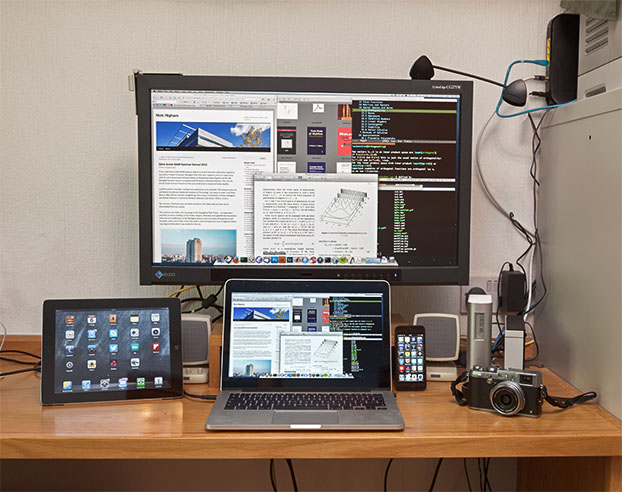
My Mac Setup

I came to Macs quite late, switching to Mac laptops in 2009 because of the quality of the hardware. Over the last year I have taken my 13-inch MacBook Pro Retina to China, the USA and Europe. With the World Travel Adapter Kit to allow hassle-free power connections, this is the ultimate machine for travelling.

I still use Windows desktop machines, but switching between Mac and Windows machines is easy nowadays thanks to three things: almost all the software that I use runs on both systems, Dropbox allows easy sharing of files between machines, and Windows and Mac OS X have converged so as to have very similar features and capabilities.

131006-1050-58-6084.jpg

Most of my core applications are open source: Emacs, Firefox, Thunderbird, Git for version control, Cyberduck (for ftp and ssh), and TeX Live. Mac-specific software includes iTerm2 (a replacement for Terminal), Path Finder (an enhanced Finder), Skim (PDF viewer) and Witch (app-switcher, Cmd-tab replacement). And for numerical and symbolic computation I use MATLAB.

A password manager is essential nowadays. I use 1Password, which runs on all my Apple hardware and Windows, and I sync it via Dropbox.

On the iPhone a couple of free apps are proving very useful. MapsWithMe gives offline maps downloadable by country, and since it only needs a GPS signal it’s great for finding where you are while on a train, or in a foreign country. As long as I have the iPhone in my pocket, Moves is good at counting my number of steps per day, which is sadly all too low, and records my time spent travelling. It also has the handy feature of showing on a map where you have been, which is useful if you are lost and want to retrace your steps.

On my MacBook Pro I have File Vault turned on, so that the hard disk is encrypted. I’m impressed with how little overhead this creates with the Core i7 Ivy bridge chip and an SSD. I also like the way File Vault works with Find My Mac to trap thieves via the Guest account (as detailed in this article)!

I continue to use Windows desktop machines. Two particular reasons are that I have not found Mac programs that match the functionality of Xyplorer (file manager) and Fineprint (printer driver), which I use many times every day.

This post is a modified version of an article titled “My Setup” that appeared in MacUser magazine, November 2013, page 126.

Cataloguing Software for Matrix Functions

I began working on functions of matrices just over thirty years ago, when I was an MSc student, my original interest being in the matrix square root. In those days relatively little research had been done on the topic and no software for evaluating matrix functions was generally available. Since then interest in matrix functions has grown greatly.

Functions of interest include the exponential, the logarithm, and real powers, along with all kinds of trigonometric functions and some less generally known functions such as the sign function and the unwinding function.

130410-1301-49-0762.jpg
Gil Strang at the Advances in Matrix Functions and Matrix Equations Workshop in Manchester, April 2013.

A large amount of software for evaluating matrix functions now exists, covering many languages (C++, Fortran, Julia, Python, …) and problem solving environments (GNU Octave, Maple, Mathematica, MATLAB, R, Scilab, …). Some of it is part of a core product or package, while other codes are available individually on researchers’ web sites. It is hard to keep up with what is available.

Edvin Deadman and I therefore decided to produce a catalogue of matrix function software, which is available in the form of MIMS EPrint 2014.8. We have organized the catalogue by language/package and documented the algorithms that are implemented. The EPrint also contains a summary of the rapidly growing number of applications in which matrix functions are used, including some that we discovered only recently, and a list of what we regard as the best current algorithms.

Producing the catalogue took more work than I expected. Many packages are rather poorly documented and we sometimes had to delve deep into documentation or source code in order to find out which algorithms had been implemented.

One thing our survey shows is that the most complete and up to date collection of codes for matrix functions currently available is that in the NAG Library, which contains over 40 codes all implementing state of the art algorithms. This is no accident. We recently completed a three year Knowledge Transfer Partnership (KTP) funded by the Technology Strategy Board, the University of Manchester, and EPSRC, whose purpose was to translate matrix function algorithms into software for the NAG Engine (the underlying code base from which all NAG products are built) and to embed processes and expertise in developing matrix functions software into the company. Edvin was the Associate employed on the project and wrote all the codes, which are in Fortran.

A video about the KTP project been made by the University of Manchester and more information about the project can be obtained from Edvin’s posts at the NAG blog:

We intend to update the catalogue from time to time and welcome notification of errors and omissions.

How Accurate Are Spreadsheets in the Cloud?

For a vector x with n elements the sample variance is s_n^2 = \frac{1}{n-1} \sum_{i=1}^n (x_i - \overline{x})^2, where the sample mean is \overline{x} = \frac{1}{n} \sum_{i=1}^n x_i. An alternative formula often given in textbooks is s_n^2 = \frac{1}{n-1} \left( \sum_{i=1}^n x_i^2 - \frac{1}{n} \left(\sum_{i=1}^n x_i \right)^2 \, \right). This second formula has the advantage that it can be computed with just one pass through the data, whereas the first formula requires two passes. However, the one-pass formula can suffer damaging subtractive cancellation, making it numerically unstable. When I wrote my book Accuracy and Stability of Numerical Algorithms I found that several pocket calculators appeared to use the one-pass formula.

How do spreadsheets apps available in web browsers and hosted in the cloud fare on computations such as this? I used Google Sheets to compute the standard deviation of vectors of the form x = [m, m+1, m+2] (Google Sheets does not seem to have a built-in function for the sample variance; the standard deviation is the square root of the sample variance). Here is what I found. (The spreadsheet that produced these results is available as this xlsx file. Note that if you click on that link it will probably load into Excel and display the correct result.)

m Exact standard deviation Google’s result
10^7 1 1
10^8 1 0

The incorrect result 0 for m=10^8 is what I would expect from the one-pass formula in IEEE double precision arithmetic, which has the equivalent of about 16 significant decimal digits of precision, since \sum_{i=1}^n x_i^2 and \frac{1}{n} \left(\sum_{i=1}^n x_i\right)^2 are both about 10^{16} and so there is not enough precision to retain the difference (which is equal to 2). A computation in MATLAB verifies that the one-pass formula returns 0 in IEEE double precision arithmetic.

It seems that Google Sheets is using IEEE double precision arithmetic internally, because the expression 3\times (4/3-1)-1 evaluates to 2.2E-16. So it appears that Google may be using the one-pass formula.
This use of the unstable formula is deeply unsatisfactory, but it is just the tip of the iceberg. In a recent paper Spreadsheets in the Cloud—Not Ready Yet, Bruce McCullough and Talha Yalta show that Google Sheets, Excel Web App and Zoho Sheet all fail on various members of a set of “sanity tests”. This might not be too surprising if you are aware of McCullough’s earlier work in which he found errors in several versions of Microsoft Excel.

However, spreadsheets in the cloud bring further complications, as noted by McCullough and Yalta:

  • These spreadsheets apps do not carry version information and the software can be changed by the provider at any time without announcement. It is therefore impossible to reproduce results computed previously.
  • The hardware and software environment on which the software is running is not specified, which adds another level of irreproducibility.
  • McCullough and Yalta found that the Excel Web App could produce different output from Excel 2010. Anyone moving a spreadsheet between the two applications could be in for a surprise.

The conclusion: use spreadsheets in the cloud at your peril! In fact, I avoid spreadsheets altogether. Anything I want to do can be done better in MATLAB, LaTeX or Emacs ORG mode.

A Black Background for More Restful PDF viewing

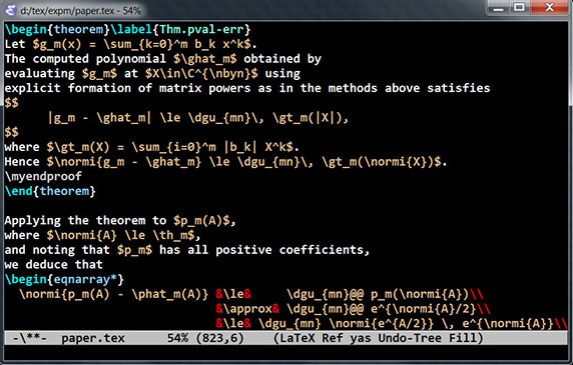
I find that large expanses of white on my screen can be hard on the eyes, so I’ve customized the colours of my main applications to yellow or white on black. For example, this is what my Emacs window looks like:

Emacs screen capture

I also have MATLAB (via Preferences – Colors) and Thunderbird (via various customizations) set to a black background.

I recently realized that I can get a black background in my two PDF viewers.

Acrobat Pro or Acrobat Reader (Windows or Mac)

Set preferences via

Edit - Preferences - Accessibility - Replace Document Colors 
     - Use High Contrast Colors

which gives the option for white, yellow or green on black, or you can choose a custom background and foreground color.

SumatraPDF (Windows)

Call SumatraPDF with the -invert-colors option, for example as

SumatraPDF.exe -reuse-instance -invert-colors paper.pdf

This is an excellent PDF viewer for use with LaTeX, as it refreshes the view when the PDF file changes, unlike Acrobat.

Skim (Mac)

Unfortunately, for Skim it only appears to be possible to change the colour of the border, not the background or text.