Fun Books for Learning Programming

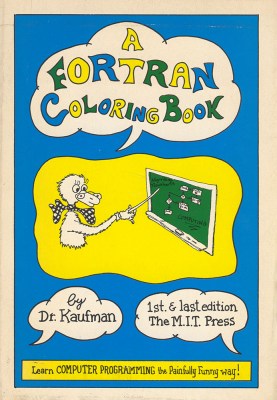
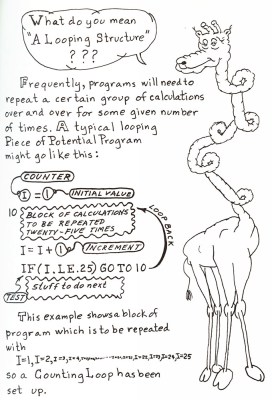
I learned Fortran from the TV course and book by Jeff Rohl. Some years later I came across A FORTRAN Coloring Book by Roger Emanuel Kaufman (MIT Press, 1978). The text is entirely handwritten (even the copyright page), is illustrated with numerous cartoons, and is full of witty wordplay. Yet it imparts the basics of Fortran very well and I could have happily learned Fortran from it. It even describes some simple numerical methods, such as the bisection method. The book is one continuous text, with no chapters or sections, but it has a good index. I’ve long been a fan of the book and Des Higham, and I include three quotes from it in MATLAB Guide.

kauf78_cover.jpg

kauf78_p75.jpg

Kaufman’s book has attracted attention in cultural studies. In the article Bend Sinister: Monstrosity and Normative Effect in Computational Practice, Simon Yuill describes it as “the first published computing text to use cartoon and comic strip drawings as a pedagogic medium” and goes on to say “and it could be argued, is the archetype to the entire For Dummies series and all its numerous imitators”. I would add that the use of cartoons within magazine articles on computing was prevalent in the 1970s, notably in Creative Computing magazine, though I don’t recall anything comparable with Kaufman’s book.

alco92_p139.jpg
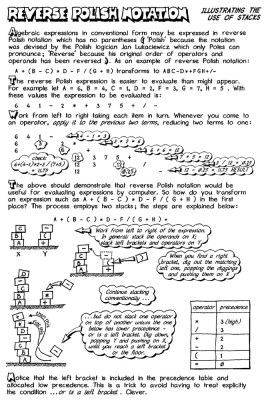
A page from Illustrating C.

A book in a similar vein and from the same era, is the handwritten Illustrating Basic by Donald Alcock (Cambridge University Press, 1977). It’s a bit like Kaufman without the jokes, and is organized into sections. This was the first in a series of such books, culminating in Illustrating C (1992). Like Kaufman’s book, Alcock’s contain nontrivial examples and are a good way for anyone to learn a programming language.

Thinking Forth by Leo Brodie, about the Forth language, is typeset but contains lots of cartoons and hand-drawn figures. It was originally published in 1984 and is now freely available under a Creative Commons license.

A more recent book with a similarly fun treatment is Land of Lisp by Conrad Barski (No Starch Press, 2011). It teaches Common Lisp, coding various games along the way. It’s typeset but is heavily illustrated with cartoons and finishes with a comic strip.

What’s New in MATLAB R2017b?

Following my earlier posts What’s New in MATLAB R2016b? and What’s New in MATLAB R2017a? I take a look here at the R2017b release of MATLAB. As before, this is not a comprehensive treatment (for which see the Release Notes), but rather a brief description of the changes in MATLAB (not the toolboxes) that are the most notable from my point of view.

Decomposition Object

MATLAB now has a way of avoiding unnecessarily repeating the factorization of a matrix. In the past, if we wanted to solve two linear systems Ax = b and Ay = c involving the same square, general nonsingular matrix A, writing

x = A\b;
y = A\c;

was wasteful because A would be LU factorized twice. The way to avoid this unnecessary work was to factorize A explicitly then re-use the factors:

[L,U] = lu(A);
x = U\(L\b);
y = U\(L\c);

This solution lacks elegance. It is also less than ideal from the point of view of code maintenance and re-use. If we want to adapt the same code to handle symmetric positive definite A we have to change all three lines, even though the mathematical concept is the same:

R = chol(A);
x = R\(R'\b);
y = R\(R'\c);

The new decomposition function creates an object that contains the factorization of interest and allows it to be re-used. We can now write

dA = decomposition(A);
x = dA\b;
y = dA\c;

MATLAB automatically chooses the factorization based on the properties of A (as the backslash operator has always done). So for a general square matrix it LU factorizes A, while for a symmetric positive definite matrix it takes the Cholesky factorization. The decomposition object knows to use the factors within it when it encounters a backslash. So this example is functionally equivalent to the first two.

The type of decomposition can be specified as a second input argument, for example:

dA = decomposition(A,'lu');
dA = decomposition(A,'chol');
dA = decomposition(A,'ldl');
dA = decomposition(A,'qr');

These usages make the intention explicit and save a little computation, as MATLAB does not have to determine the matrix type. Currently, 'svd' is not supported as a second input augment.

This is a very welcome addition to the matrix factorization capabilities in MATLAB. Tim Davis proposed this idea in his 2013 article Algorithm 930: FACTORIZE: An Object-Oriented Linear System Solver for MATLAB. In Tim’s approach, all relevant functions such as orth, rank, condest are overloaded to use a decomposition object of the appropriate type. MATLAB currently uses the decomposition object only in backslash, forward slash, negation, and conjugate transpose.

The notation dA used in the MathWorks documentation for the factorization object associated with A grates a little with me, since dA (or \Delta A) is standard notation for a perturbation of the matrix A and of course the derivative of a function. In my usage I will probably write something more descriptive, such as decompA or factorsA.

String Conversions

Functions written for versions of MATLAB prior to 2016b might assume that certain inputs are character vectors (the old way of storing strings) and might not work with the new string arrays introduced in MATLAB R2016b. The function convertStringsToChars can be used at the start of a function to convert strings to character vectors or cell arrays of character vectors:

function y = myfun(x,y,z)
[x,y,z] = convertStringToChars(x,y,z);

The pre-2016b function should then work as expected.

More functions now accept string arguments. For example, we can now write (with double quotes as opposed to the older single quote syntax for character vectors)

>> A = gallery("moler",3)
A =
     1    -1    -1
    -1     2     0
    -1     0     3

Tall Arrays

There is more support in R2017b for tall arrays (arrays that are too large to fit in memory). They can be indexed, with sorted indices in the first dimension; functions including median, plot, and polyfit now accept tall array arguments; and the random number generator used in tall array calculations can be independently controlled.

Word Clouds

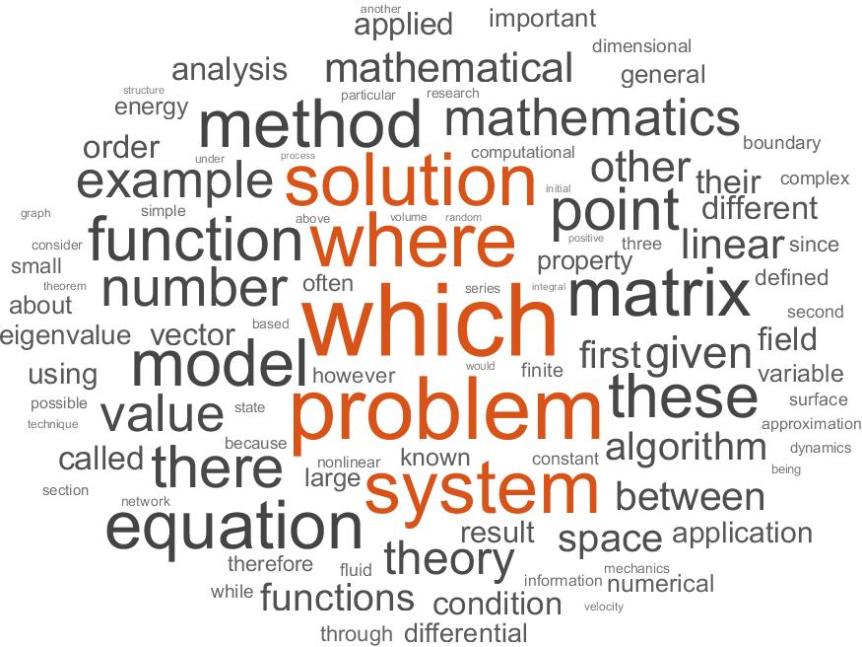
The new wordcloud function produces word clouds. The following code runs the function on a file of words from The Princeton Companion to Applied Mathematics.

words = fileread('pcam_words.txt');
words = string(words);
words = splitlines(words);
words(strlength(words)<5) = [];
words = categorical(words);
figure
wordcloud(words)

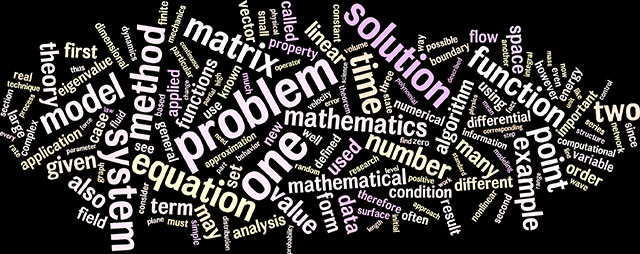
I had prepared this file in order to generate a word cloud using the Wordle website. Here is the MATLAB version followed by the Wordle version: wordcloud_pcam.jpg wordle-edited2.jpg Wordle removes certain stop words (common but unimportant words) that wordcloud leaves in. Also, whereas Wordle produces a different layout each time it is called, different layouts can be obtained from wordcloud with the syntax wordcloud(words,'LayoutNum',n) with n a nonnegative integer.

Minima and Maxima of Discrete Data

New functions islocalmin and islocalmax find local minima and maxima within discrete data. Obviously targeted at data manipulation applications, such as analysis of time series, these functions offer a number of options to define what is meant by a minimum or maximum.

The code

A = randn(10); plot(A,'LineWidth',1.5); hold on
plot(islocalmax(A).*A,'r.','MarkerSize',25); 
hold off, axis tight

finds maxima down the columns of a random matrix and produces this plot: islocalmax_plot.jpg

Whereas min and max find the smallest and largest elements of an array, the new functions mink(A,k) and maxk(A,k) find the k smallest and largest elements of A, columnwise if A is a matrix.

How Fast is Quadruple Precision Arithmetic?

170724-2024-49-7501.jpg
The 24th IEEE Symposium on Computer Arithmetic included several talks on multiprecision arithmetic.

When I am testing an algorithm running in double precision arithmetic I often want to compare the computed solution with a reference solution: a solution that is fully accurate to double precision. To obtain one I solve the same problem in quadruple precision and round the result back to double precision. If the conditioning of the problem leads me to doubt that that this reference solution will be correct to double precision, I compute it at a precision even higher than quadruple. Whether it is feasible to compute a reference solution in this way depends on the size of the problem and the speed of quadruple precision arithmetic. This is just one scenario where quadruple precision arithmetic is needed; others are discussed in my earlier post The Rise of Mixed Precision Arithmetic.

Roughly speaking, a quadruple precision number x can be represented by a pair of double precision numbers (x_1,x_2), where x = x_1 + x_2 and x_1 and x_2 represent the leading and trailing significant digits of x, respectively. Then a product x y can be written (x_1 + x_2)(y_1 + y_2) = x_1y_1 + x_1y_2 + x_2y_1 + x_2y_2, which involves four double precision multiplications and three double precision additions. We can therefore expect quadruple precision multiplication to be at least seven times slower than double precision multiplication. Almost all available implementations of quadruple precision arithmetic are in software (an exception is provided by the IBM z13 mainframe system), so we should expect quadruple precision to be slower than the theoretical prediction would suggest. Bailey and Borwein (2015) state that quadruple precision implemented in software typically runs five to ten times slower than hardware double precision arithmetic.

Various aspects need to be taken into consideration when we compare double precision and quadruple precision arithmetics. First, the relative speed of the arithmetics may depend on the type of operations being performed (scalar versus vectorizable operations), memory traffic considerations, and to what extent the implementations exploit multicore processors. Second, are we to compare the same code running in different precisions or computational kernels coded specially for each precision? I will take the second approach, as it is more relevant to my usage of quadruple precision. However, this does mean that I am comparing algorithms and their implementations as well as the underlying arithmetic.

I have done some very simple comparisons in MATLAB using the VPA arithmetic of the Symbolic Math Toolbox and the MP arithmetic of the third party Multiprecision Computing Toolbox from Advanpix.

The Multiprecision Computing Toolbox supports IEEE-compliant quadruple precision arithmetic, which is invoked by using the function mp.Digits to set the precision to 34 decimal digits (in fact, this is the default). For the VPA arithmetic in the Symbolic Math Toolbox 34 decimal digit precision is specified with the command digits(34) (the default is 32 digits). According to the documentation, VPA arithmetic uses a few guard digits, that is, it computes with a few extra digits of precision. The number of guard digits cannot be set by the user. In the Multiprecision Computing Toolbox the number of guard digits can be set with the function mp.GuardDigits, and the default is to use no guard digits.

These experiments were performed on an Intel Broadwell-E Core i7-6800K CPU @ 3.40GHz, which has 6 cores. The software details are:

MATLAB Version: 9.2.0.538062 (R2017a)
Operating System: Microsoft Windows 10 Home Version 10.0
                  (Build 15063)
Advanpix Multiprecision Computing Toolbox   Version 4.4.1.12580   
Symbolic Math Toolbox                       Version 7.2  (R2017a)

Further details on the Multiprecision Computing Toolbox can be seen by typing mp.Info, which lists details of open source libraries that are used.

In these experiments I do not check that the computed results are correct. Such checks are done in more extensive tests available in the test scripts at https://www.advanpix.com/2015/02/12/version-3-8-0-release-notes/. I note that the timings vary from run to run, but it is the order of magnitudes of the ratios that are of interest and these are correctly reflected by the reported results.

Test 1: LU Factorization

This code compares the speed of the arithmetics for LU factorization of a 250-by-250 matrix.

%QUAD_PREC_TEST1  LU factorization.
rng(1), n = 250;
A = randn(n); A_mp = mp(A,34); A_vpa = vpa(A,34);
t = clock; [L,U] = lu(A);     t_dp = etime(clock, t)
t = clock; [L,U] = lu(A_mp);  t_mp = etime(clock, t)
t = clock; [L,U] = lu(A_vpa); t_vpa = etime(clock, t)
fprintf('mp/double: %8.2e, vpa/double: %8.2e, vpa/mp: %8.2e\n',....
         t_mp/t_dp, t_vpa/t_dp, t_vpa/t_mp)

The output is

t_dp =
   1.0000e-03
t_mp =
   9.8000e-02
t_vpa =
   2.4982e+01
mp/double: 9.80e+01, vpa/double: 2.50e+04, vpa/mp: 2.55e+02

Here, the MP quadruple precision is 98 times slower than double precision, but VPA is 25,000 times slower than double precision.

Test 2: Complete Eigensystem of Nonsymmetric Matrix

%QUAD_PREC_TEST2  Complete eigensystem of nonsymmetric matrix.
rng(1), n = 125;
A = randn(n); A_mp = mp(A,34); A_vpa = vpa(A,34);
t = clock; [V,D] = eig(A);     t_dp = etime(clock, t)
t = clock; [V,D] = eig(A_mp);  t_mp = etime(clock, t)
t = clock; [V,D] = eig(A_vpa); t_vpa = etime(clock, t)
fprintf('mp/double: %8.2e, vpa/double: %8.2e, vpa/mp: %8.2e\n',....
         t_mp/t_dp, t_vpa/t_dp, t_vpa/t_mp)

The output is

t_dp =
   1.8000e-02
t_mp =
   1.3430e+00
t_vpa =
   1.0839e+02
mp/double: 7.46e+01, vpa/double: 6.02e+03, vpa/mp: 8.07e+01

Here, MP is 75 times slower than double, and VPA is closer to the speed of MP.

Test 3: Complete Eigensystem of Symmetric Matrix

%QUAD_PREC_TEST3  Complete eigensystem of symmetric matrix.
rng(1), n = 200;
A = randn(n); A = A + A'; A_mp = mp(A,34); A_vpa = vpa(A,34);
t = clock; [V,D] = eig(A);     t_dp = etime(clock, t)
t = clock; [V,D] = eig(A_mp);  t_mp = etime(clock, t)
t = clock; [V,D] = eig(A_vpa); t_vpa = etime(clock, t)
fprintf('mp/double: %8.2e, vpa/double: %8.2e, vpa/mp: %8.2e\n',....
         t_mp/t_dp, t_vpa/t_dp, t_vpa/t_mp)

The output is

t_dp =
   1.1000e-02
t_mp =
   3.5800e-01
t_vpa =
   1.2246e+02
mp/double: 3.25e+01, vpa/double: 1.11e+04, vpa/mp: 3.42e+02

Note that there are at least three different algorithms that could be used here (the QR algorithm, divide and conquer, and multiple relatively robust representations), so the three eig invocations may be using different algorithms.

Test 4: Componentwise Exponentiation

%QUAD_PREC_TEST4  Componentwise exponentiation.
rng(1), n = 1000;
A = randn(n); A_mp = mp(A,34); A_vpa = vpa(A,34);
t = clock; X = exp(A);     t_dp = etime(clock, t)
t = clock; X - exp(A_mp);  t_mp = etime(clock, t)
t = clock; X - exp(A_vpa); t_vpa = etime(clock, t)
fprintf('mp/double: %8.2e, vpa/double: %8.2e, vpa/mp: %8.2e\n',....
         t_mp/t_dp, t_vpa/t_dp, t_vpa/t_mp)

The output is

t_dp =
   7.0000e-03
t_mp =
   8.5000e-02
t_vpa =
   3.4852e+01
mp/double: 1.21e+01, vpa/double: 4.98e+03, vpa/mp: 4.10e+02

Both MP and VPA come closer to double precision on this problem of computing the scalar exponential at each matrix element.

Summary

Not too much emphasis should be put on the precise timings, which vary with the value of the dimension n. The main conclusions are that 34-digit MP arithmetic is 1 to 2 orders of magnitude slower than double precision and 34-digit VPA arithmetic is 3 to 4 orders of magnitude slower than double precision.

It is worth noting that the documentation for the Multiprecision Computing Toolbox states that the toolbox is optimized for quadruple precision.

It is also interesting to note that the authors of the GNU MPFR library (for multiple-precision floating-point computations with correct rounding) are working on optimizing the library for double precision and quadruple precision computations, as explained in a talk given by Paul Zimmermann at the 24th IEEE Symposium on Computer Arithmetic in July 2017; see the slides and the corresponding paper.

[Updated September 6, 2017 to clarify mp.Info and April 6, 2018 to change “Multiplication” to “Multiprecision” in penultimate paragraph.]

Elements of MATLAB Style

140415-1443-12-4032-cropped.jpg

Style is an important aspect of writing, and also of programming. While MATLAB is a quick and easy language in which to program, style should not be neglected. Good style aids readability, which in turn makes it easier to debug and maintain code. It also fosters confidence in the code. Here are six style tips, in which the examples given are all inspired by real-life code that I have come across.

For more on MATLAB style see the book MATLAB Guide, and in particular section 16.1, “Elements of Coding Style”.

1. Omit Unnecessary Parentheses

% Bad style.
x = (A')\b;
y = [1];
D = (diag(x));

The parentheses around A' are unnecessary. Without them, the statement is legal and unambiguous. But of course the parentheses would be necessary in, for example, x = (A*B)'\c;

y is a scalar. There is no need to enter it as a 1-by-1 matrix by putting it in square brackets.

There is no need for parentheses around the diag function.

% Good style.
x = A'\b;
y = 1;
D = diag(x);

2. Use Spaces Consistently

% Bad style.
q=sqrt(2);
a = 1;
Z =zeros(3);
for i=1:10, q=q+1/q; end

Stick to a convention about spacing around around equals signs and plus and minus signs. I think spaces make the code more readable.

% Good style.
q = sqrt(2);
a = 1;
Z = zeros(3);
for i = 1:10, q = q + 1/q; end

3. Omit Unnecessary Semicolons and Commas

% Bad style.
figure;
for i = 2:n,
    x(i) = x(i-1)^2*y(i);
end;

Semicolons suppress output, but in this example there is no need for the them since no output is returned by the figure or end functions. The comma would only be necessary if the for loop was collapsed onto one line.

% Good style.
figure
for i = 2:n
    x(i) = x(i-1)^2*y(i);
end

4. Use the Appropriate Construct

The following if statement is perfectly correct.

% Bad style.
if flag == 1
   fprintf('Failed to converge.\n')
elseif flag == 2
   fprintf('Overflow encountered.\n')
elseif flag == 3
   fprintf('Division by zero.\n')
elseif flag == 4
   fprintf('Tolerance too small.\n')
end

But given its regular structure, it is better written as a switch statement, which is shorter, brings out the parallelism in the logic, and is easier to check.

% Good style.
switch flag
   case 1, fprintf('Failed to converge.\n')
   case 2, fprintf('Overflow encountered.\n')
   case 3, fprintf('Division by zero.\n')
   case 4, fprintf('Tolerance too small.\n')
end

5. Omit Trailing Tildes

In the list of output arguments in a function call a tilde signifies that the output argument in that position is not wanted and so can be discarded (and hence need not be computed). This notation was introduced in MATLAB R2009b. Generally, there is no point in providing a tilde as the last output argument, as a well written function will check the number of requested outputs and not compute any trailing outputs that are not requested.

The singular value decomposition (SVD) of a matrix A is computed by the call [U,S,V] = svd(A). In the following example we wish to compute the left singular vectors of A but not the singular values or right singular vectors.

% Bad style.
[U,~,~] = svd(A);

% Good style
[U,~] = svd(A);

An obvious question is why the second example was not shortened to

U = svd(A);

The reason is that with one output argument the svd function has a special behavior: it returns a matrix of singular values, not the matrix U of left singular vectors.

6. Include an H1 line in Program Files

The H1 line in a MATLAB program file is a comment line that is the second line in the file and contains the program name followed by a one-line description of the program. It is good practice to provide every program with an H1 line, as MATLAB itself does. Several MATLAB functions make use of H1 lines. For example, when the help function is invoked with a directory name and the directory in question does not contain a contents.m file, a list of contents is created from the H1 lines of the program files in the directory and displayed.

Here is an example of a function with an H1-line (this is an updated version of a function from The Matrix Computation Toolbox).

function show(x)
%SHOW   Display signs of matrix elements.
%   SHOW(X) displays X in `FORMAT +' form, that is,
%   with `+', `-' and  blank representing positive, negative
%   and zero elements respectively.

f = get(0,'Format'); % Get current numerical format.
format +
disp(x)
format(f)            % Restore original numeric format.

How to Print a Page Across Multiple Pages with Adobe Acrobat

Occasionally I need to proof a PDF document that is too small to read comfortably when printed in the usual way. This is the case with my columns for SIAM News, as SIAM News is A3 format whereas my printer is A4.` ‘ A simple solution is to use the Poster option under “Page Size & Handling” in Adobe Acrobat’s print dialog box. Acrobat will print each page over multiple pages that, if joined together, reproduce the original pages (except for the white margins). The preview window in the dialog box shows how each page will be split into pieces. You can adjust the percentage in the “Tile Scale” box to increase or decrease the number of printed pages per original page.

acrobat-poster.jpg

(This screen capture shows Adobe Acrobat version 11.0.19; the dialog box may be different in other versions of Acrobat.)

Here is a photograph of the result laid out on my office floor, with the four A4 sheets arranged to match the original document. (This is the proofs of my April 2017 SIAM News column.)

170317-0952-56-6777.jpg

This Poster option is no doubt particularly intended for proofing posters on an A4 or A3 printer, as they are typically designed for printing at A0 or A1.

You may notice that in the screen capture above my printer is Fineprint. This is an application that acts as a Windows printer driver and captures and displays what is printed to it, possibly from multiple print commands. It allows the user to reorder, magnify (via the “Enlarge” option), and edit pages before actually printing them, and printing can be 1-up, 2-up, 4-up, or 8-up. I have been using FinePrint for many years and could not live without it. It saves me paper and by allowing me to reduce the margins makes documents much easier to read. The following screen capture shows FinePrint after printing the document shown above with the Poster option at 120%.

fineprint-ex.jpg

What’s New in MATLAB R2017a?

MATLAB R2017a was released last week. Many of the changes reported in the release notes are evolutionary, building on and extending major new features introduced previously. For example, the Live Editor continues to gain expanded capabilities. In this post I pick out a few new features that caught my eye. This is very much a personal selection. For full details of what’s new, see the release notes, and see also my previous post What’s New in MATLAB R2016b if you are not familiar with R2016b.

Parula

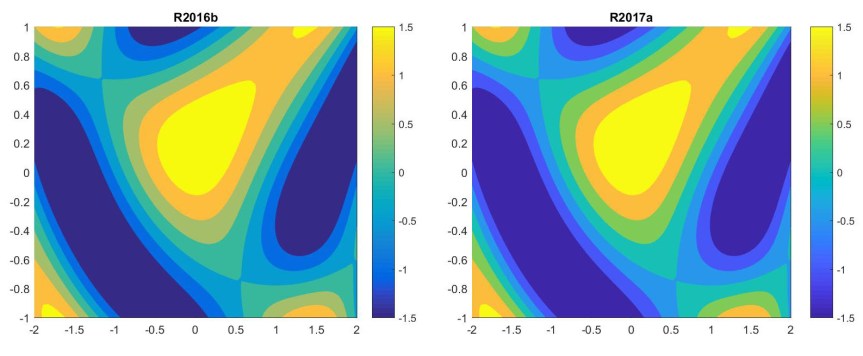
The parula color map has been modified slightly. The difference is subtle, but as the following example illustrates, the R2017a parula is a bit more vibrant and has a bit less cyan and yellow in the blues and greens.

parula-2016b-2017a.jpg

I note, however, that the difference between the old and the new parula is smaller when the images are converted to the CMYK color space, as they must be for printing.

Heatmap

The new heatmap function plots a heatmap of tabular data. Although it is intended mainly for use with the table data type, I think heatmap will be useful for getting insight into the structure of matrices, as illustrated by the following examples.

heatmaps.jpg

String Arrays

String arrays, introduced in MATLAB R2016b, can now be formed using double quotes:

>> s = string('This is a string') % R2016b
s = 
    "This is a string"
>> t = "This is a string"         % R2017a
t = 
    "This is a string"
>> isequal(s,t)
ans =
  logical
   1
>> whos
  Name      Size            Bytes  Class     Attributes

  s         1x1               166  string              
  t         1x1               166  string

However, there is one major caveat. Many MATLAB functions that take a char as input argument have not yet been adapted to accept strings. Hence

>> A = gallery('moler',3)
A =
     1    -1    -1
    -1     2     0
    -1     0     3
>> A = gallery("moler",3)
Error using nargin
Argument must be either a character vector or a function handle.
Error in gallery (line 191)
nargs = nargin(matname);

I expect that such functions will be updated in future releases.

Missing

A new function missing creates missing values appropriate to the data type in question.

>> A = ones(2); A(2,2) = missing
A =
     1     1
     1   NaN

> d = datetime('2014-05-26')
d = 
  datetime
   26-May-2014
>> d(2) = missing
d = 
  1×2 datetime array
   26-May-2014   NaT

Until converted to the target datatype, a missing value has class missing:

>> m = missing
m = 
  missing
    
>> class(m)
ans =
    'missing'

Performance Improvements

The release notes report performance improvements under a variety of headings, including execution engine, scripts, and mathematics functions. These are very welcome, as the user automatically benefits from them. One comment that caught my eye is “The backslash command A\B is faster when operating on negative definite matrices”. I think this means that MATLAB checks whether the matrix, A, is symmetric with all negative diagonal elements and, if it is, attempts a Cholesky factorization of -A.

Tracing the Early History of MATLAB Through SIAM News

A recent blog post by Ned Gulley points out that the new mathematics gallery (“Mathematics: The Winton Gallery”) at the Science Museum, London, contains a copy of the disk and manual for MATLAB 1.3, from 1985, sitting next to a trial assembly of Charles Babbage’s analytical engine.

This set me thinking about the early history of MATLAB and The MathWorks. Items such as manuals and disks must be quite rare nowadays. What other traces are there of early MATLAB history? I have recently been looking through some back issues of SIAM News and spotted a number of adverts for MATLAB over the period 1985–1991. Let’s see what historical insight these early adverts give.

1985

sinews-1985-18-2-mathworks_ad.jpg PDF file

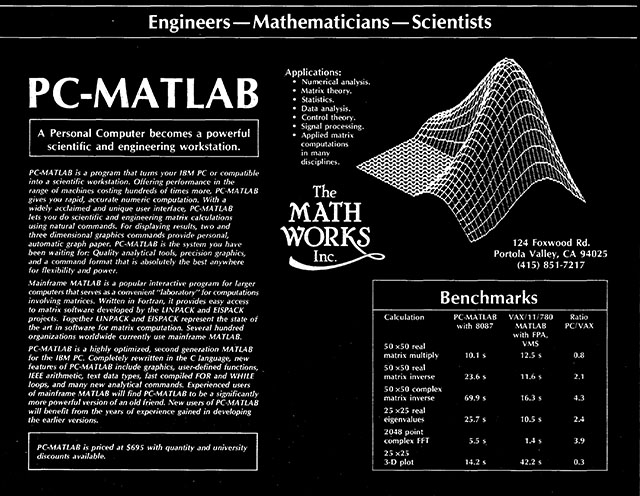
The first advert I can find is from the March 1985 SIAM News, and it is for PC-MATLAB, priced at $695, running on an IBM-PC or compatible computer. The advert features the now famous MathWorks logo, which represents an eigenfunction of the L-shaped membrane. It quotes a time of 10.1 seconds for a 50-by-50 real matrix multiplication on a machine with an Intel 8087 coprocessor. This floating-point coprocessor was a useful add-on to the IBM-PC, which used the Intel 8086 chip.

MATLAB benefited from being launched at a time when the IBM PC with 8087 coprocessor was just starting to become popular. The 8086-8087 combination made it possible to carry out computations on a desktop PC that had previously required a minicomputer—and they could now be done with the interactive MATLAB interface.

The advert mentions “mainframe MATLAB”, which it says is written in Fortran, runs on “larger computers”, and is in use in several hundred organizations worldwide.

PC-MATLAB had been rewritten in C, and it supported graphics, IEEE arithmetic (as implemented in the 8087), and “user-defined functions” (M-files).

Note that at this time MathWorks was located at 124 Foxwood Road, Portola Valley, California. In his article The Growth of MATLAB and The MathWorks Over Two Decades, Cleve Moler explains that this first mailing address was “a rented A-frame cabin where Jack [Little] lived in the hills above Stanford University in Portola Valley, California”.

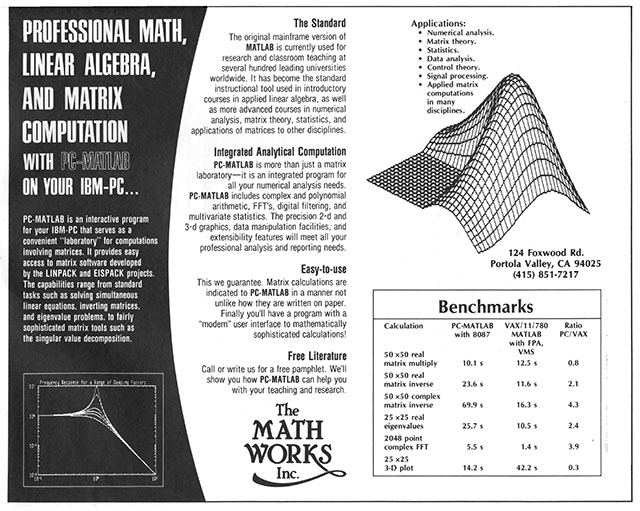
The September 1985 issue of SIAM News contains a rather different advert that now refers to “the original mainframe version of MATLAB” and emphasizes the ease of use of MATLAB.

sinews-1985-18-5-mathworks_ad.jpg PDF file

1987

sinews-1987-20-1-mathworks_ad.jpg PDF file

The next advert is from the January 1987 SIAM News. MATLAB is now also available as Pro-MATLAB running on a Sun workstation or a VAX computer. M-files are now mentioned by that name and LINPACK benchmark figures are stated, the largest figure being 98 Kflops on the MicroVAX II.

The MathWorks has now moved to Massachusetts.

1990

sinews-1990-23-3-mathworks_ad.jpg PDF file

The advert in the May 1990 SIAM News gives a version number, MATLAB 3.5, and it announces the Signal Processing Toolbox. It boasts that MATLAB has over 400 built-in functions and supports an enlarged range of computers, which include Cray supercomputers. The benchmark for a 50-by-50 real matrix multiplication is now down to 0.71 seconds on a 20 Mhz 386-based PC: a reduction by a factor of 14 from the figure quoted in 1985.

A strange feature of the advert is that the toolbox is only explicitly mentioned in the box at top left and the meaning of “toolbox” is not stated.

The MathWorks address has changed again, to 21 Eliot St., South Natick, Massachusetts. In the article mentioned above, Cleve explains, “When the company reached about a dozen employees, we moved several miles east to take over the second floor of a lovely building in South Natick, Massachusetts”.

1991

sinews-1991-24-5-mathworks_ad.jpg PDF file

The advert in the May 1991 issue of SIAM News focuses on two new toolboxes: the Spline Toolbox and the Optimization Toolbox. The gray box defines toolboxes as “sets of routines written in the MATLAB programming language for specialized applications”.

MathWorks is now located at Cochituate Place on Prime Park Way in Natick. The street was so-named because it had been the home of the Prime Computer Corporation, which produced minicomputers from 1972 to 1992.

These adverts give some insight into the development of MATLAB in its early years. They also show how the rapid growth of MathWorks necessitated frequent relocation of the company. Indeed, in the article mentioned above Cleve Moler notes that the number of employees roughly doubled every year for the first seven years.

Good Times in MATLAB: How to Typeset the Multiplication Symbol

The MATLAB output

>> A = rand(2); whos
  Name      Size            Bytes  Class     Attributes

  A         2x2                32  double

will be familiar to seasoned users. Consider this, however, from MATLAB R2016b:

>> s = string({'One','Two'})

s = 
  1×2 string array
    "One"    "Two"

At first sight, you might not spot anything unusual, other than the new string datatype. But there are two differences. First, MATLAB prints a header giving the type and size of the array. It does so for arrays of type other than double precision and char. Second, the times symbol is no longer an “x” but is now a multiplication symbol: “×”.

The new “times” certainly looks better. There are still remnants of “x”, for example in whos s for the example above, but I presume that all occurrences of “x” will be changed to the new symbol in the next release

However, there is a catch: the “×” symbol is a Unicode character, so it will not print correctly when you include the output in LaTeX (at least with the version provided in TeX Live 2016). Moreover, it may not even save correctly if your editor is not set up for Unicode characters.

Here is how we dealt with the problem in the third edition (published in January 2017) of MATLAB Guide. We put the code

\usepackage[utf8x]{inputenc}
\DeclareUnicodeCharacter{0215}{\ensuremath{\times}}

in the preamble of the master TeX file, do.tex. We also told our editor, Emacs, to use a UTF-8 coding, by putting the following code at the end of each included .tex file (we have one file per chapter):

%%% Local Variables:
%%% coding: utf-8
%%% mode: latex
%%% TeX-master: "do"
%%% End:

With this setup we can cut and paste output including “×” into our .tex files and it appears as expected in the LaTeX output.

What’s New in MATLAB R2016b

MATLAB R2016b was released in the middle of September 2016. In this post I discuss some of its new features (I will not consider the toolboxes). This is personal selection of highlights; for a complete overview see the Release Notes.

The features below are discussed in greater detail in the third edition of MATLAB Guide, to be published by SIAM in December 2016.

Live Editor

The Live Editor, introduced in R2016a, provides an interactive environment for editing and running MATLAB code. When the code that you enter is executed the results (numerical or graphical) are displayed in the editor. The code is divided into sections that can be evaluated, and subsequently edited and re-evaluated, individually. The Live Editor works with live scripts, which have a .mlx extension. Live scripts can be published (exported) to HTML or PDF. R2016b adds more functionality to the Live Editor, including an improved equation editor and the ability to pan, zoom, and rotate axes in output figures​.

The Live Editor is particularly effective with the Symbolic Math Toolbox, thanks to the rendering of equations in typeset form, as the following image shows.

live-editor1.jpg

The Live Editor is a major development, with significant benefits for teaching and for script-based workflows. No doubt we will see it developed further in future releases.

Implicit Expansion

I have already written about this powerful generalization of the long-standing MATLAB feature of scalar expansion. See this blog post.

Local Functions

Local functions are what used to be called subfunctions: they are functions within functions or, to be more precise, functions that appear after the main function in a function file. What’s new in R2016b is that a script can have local functions. This is a capability I have long wanted. When writing a script I often find that a particular computation or task, such as printing certain statistics, needs to be repeated at several places in the script. Now I can put that code in a local function instead of repeating the code or having to create an external function for it.

String Arrays

MATLAB has always had strings, created with a single quote, as in

s = 'a string'

which sets up a 1-by-8 character vector. A new datatype string has been introduced. A string is an array for which each entry contains a character vector. The syntax

str = string('a string')

sets up a 1-by-1 string array, whereas

str = string({'Boston','Manchester'})

sets up a 1-by-2 string array via a cell array. String arrays are more memory efficient than cell arrays and allow for more flexible handling of strings. They are particularly useful in conjunction with tables. According to this MathWorks video, string arrays “have a multitude of new methods that have been optimized for performance”. At the moment, support for strings across MATLAB is limited and it is inconvenient to have to set up a string array by passing a cell array to the string function. No doubt string arrays will be integrated more seamlessly in future releases.

Tall Arrays

Tall arrays provide a way to work with data that does not fit into memory. Calculations on tall arrays are delayed until a result is explicitly requested with the gather function. MATLAB optimizes the calculations to try to minimize the number of passes through the data. Tall arrays are created with the tall function, which take as argument an array (numeric, string, datetime, or one of several other data types) or a datastore. Many MATLAB functions (but not the linear algebra functions, for example) work the same way with tall arrays as they do with in-memory arrays.

Timetables

Tables were introduced in R2013b. They store tabular data, with columns representing variables of possibly different types. The newly introduced timetable is a table for which each row has an associated date and time, stored in the first column. The timerange function produces a subscript that can be used to select rows corresponding to a particular time interval. These new features make MATLAB an even more powerful tool for data analysis.

Missing Values

MATLAB has new capabilities for dealing with missing values, which are defined according to the data type: NaNs (Not-a-Number) for double and single data, NaTs (Not-a-Time) for datetime data, <undefined> for categorical data, and so on. For example, the function ismissing detects missing data and fillmissing fills in missing data according to one of several rules.

Mac OS Version

I have Mac OS X Version 10.9.5 (Mavericks) on my Mac. Although this OS is not officially supported, R2016b installed without any problem and runs fine. The pre-release versions of R2016a and R2016b would not install on Mavericks, so it seems that compatibility with older operating systems is ensured only for the actual release.

At the time of writing, there are some compatibility problems with Mac OS Version 10.12 (Sierra) for certain settings of Language & Region.

Implicit Expansion: A Powerful New Feature of MATLAB R2016b

The latest release of MATLAB, R2016b, contains a feature called implicit expansion, which is an extension of the scalar expansion that has been part of MATLAB for many years. Scalar expansion is illustrated by

>> A = spiral(2), B = A - 1
A =
     1     2
     4     3
B =
     0     1
     3     2

Here, MATLAB subtracts 1 from every element of A, which is equivalent to expanding the scalar 1 into a matrix of ones then subtracting that matrix from A.

Implicit expansion takes this idea further by expanding vectors:

>> A = ones(2), B = A + [1 5]
A =
     1     1
     1     1
B =
     2     6
     2     6

Here, the result is the same as if the row vector was replicated along the first dimension to produce the matrix [1 5; 1 5] then that matrix was added to ones(2). In the next example a column vector is added and the replication is across the columns:

>> A = ones(2) + [1 5]'
A =
     2     2
     6     6

Implicit expansion also works with multidimensional arrays, though we will focus here on matrices and vectors.

So MATLAB now treats “matrix plus vector” as a legal operation. This is a controversial change, as it means that MATLAB now allows computations that are undefined in linear algebra.

Why have MathWorks made this change? A clue is in the R2016b Release Notes, which say

For example, you can calculate the mean of each column in a matrix A, then subtract the vector of mean values from each column with A - mean(A).

This suggests that the motivation is, at least partly, to simplify the coding of manipulations that are common in data science.

Implicit expansion can also be achieved with the function bsxfun that was introduced in release R2007a, though I suspect that few MATLAB users have heard of this function:

>> A = [1 4; 3 2], bsxfun(@minus,A,mean(A))
A =
     1     4
     3     2
ans =
    -1     1
     1    -1

>> A - mean(A)
ans =
    -1     1
     1    -1

Prior to the introduction of bsxfun, the repmat function could be used to explicitly carry out the expansion, though less efficiently and less elegantly:

>> A - repmat(mean(A),size(A,1),1)
ans =
    -1     1
     1    -1

An application where the new functionality is particularly attractive is multiplication by a diagonal matrix.

>> format short e
>> A = ones(3); d = [1 1e-4 1e-8];
>> A.*d  %  A*diag(d)
ans =
   1.0000e+00   1.0000e-04   1.0000e-08
   1.0000e+00   1.0000e-04   1.0000e-08
   1.0000e+00   1.0000e-04   1.0000e-08
>> A.*d' % diag(d)*A
ans =
   1.0000e+00   1.0000e+00   1.0000e+00
   1.0000e-04   1.0000e-04   1.0000e-04
   1.0000e-08   1.0000e-08   1.0000e-08

The .* expressions are faster than forming and multiplying by diag(d) (as is the syntax bsxfun(@times,A,d)). We can even multiply with the inverse of diag(d) with

>> A./d
ans =
           1       10000   100000000
           1       10000   100000000
           1       10000   100000000

It is now possible to add a column vector to a row vector, or to subtract them:

>> d = (1:3)'; d - d'
ans =
     0    -1    -2
     1     0    -1
     2     1     0

This usage allows very short expressions for forming the Hilbert matrix and Cauchy matrices (look at the source code for hilb.m with type hilb or edit hilb).

The max and min functions support implicit expansion, so an elegant way to form the matrix A with (i,j) element \min(i,j) is with

d = (1:n); A = min(d,d');

and this is precisely what gallery('minij',n) now does.

Another function that can benefit from implicit expansion is vander, which forms a Vandermonde matrix. Currently the function forms the matrix in three lines, with calls to repmat and cumprod. Instead we can do it as follows, in a formula that is closer to the mathematical definition and hence easier to check.

A = (v(:) .^ (n-1:-1:0)')';  % Equivalent to A = vander(v)

The latter code is, however, slower than the current vander for large dimensions, presumably because exponentiating each element independently is slower than using repeated multiplication.

An obvious objection to implicit expansion is that it could cause havoc in linear algebra courses, where students will be able to carry out operations that the instructor and textbook have said are not allowed. Moreover, it will allow programs with certain mistyped expressions to run that would previously have generated an error, making debugging more difficult.

I can see several responses to this objection. First, MATLAB was already inconsistent with linear algebra in its scalar expansion. When a mathematician writes (with a common abuse of notation) A - \sigma, with a scalar \sigma, he or she usually means A - \sigma I and not A - \sigma E with E the matrix of ones.

Second, I have been using the prerelease version of R2016b for a few months, while working on the third edition of MATLAB Guide, and have not encountered any problems caused by implicit expansion—either with existing codes or with new code that I have written.

A third point in favour of implicit expansion is that it is particularly compelling with elementwise operations (those beginning with a dot), as the multiplication by a diagonal matrix above illustrates, and since such operations are not a part of linear algebra confusion is less likely.

Finally, it is worth noting that implicit expansion fits into the MATLAB philosophy of “useful defaults” or “doing the right thing”, whereby MATLAB makes sensible choices when a user’s request is arguably invalid or not fully specified. This is present in the many functions that have optional arguments. But it can also be seen in examples such as

% No figure is open and no parallel pool is running.
>> close         % Close figure.
>> delete(gcp)   % Shut down parallel pool.

where no error is generated even though there is no figure to close or parallel pool to shut down.

I suspect that people’s reactions to implicit expansion will be polarized: they will either be horrified or will regard it as natural and useful. Now that I have had time to get used to the concept—and especially now that I have seen the benefits both for clarity of code (the minij matrix) and for speed (multiplication by a diagonal matrix)—I like it. It will be interesting to see the community’s reaction.